
Prospica

type it once.

Stop copying the same information everywhere.

Prospica looks after the repetitive jobs in your business: new enquiries, quote follow-ups, contract drafts, contract and renewal dates, the licences and insurance that expire, and more as we add them. It works alongside the tools you already use.

“Talk to us” sends an enquiry. It isn't a sign-up, and nothing is charged.

Inside Prospica

Every job, one place to look.

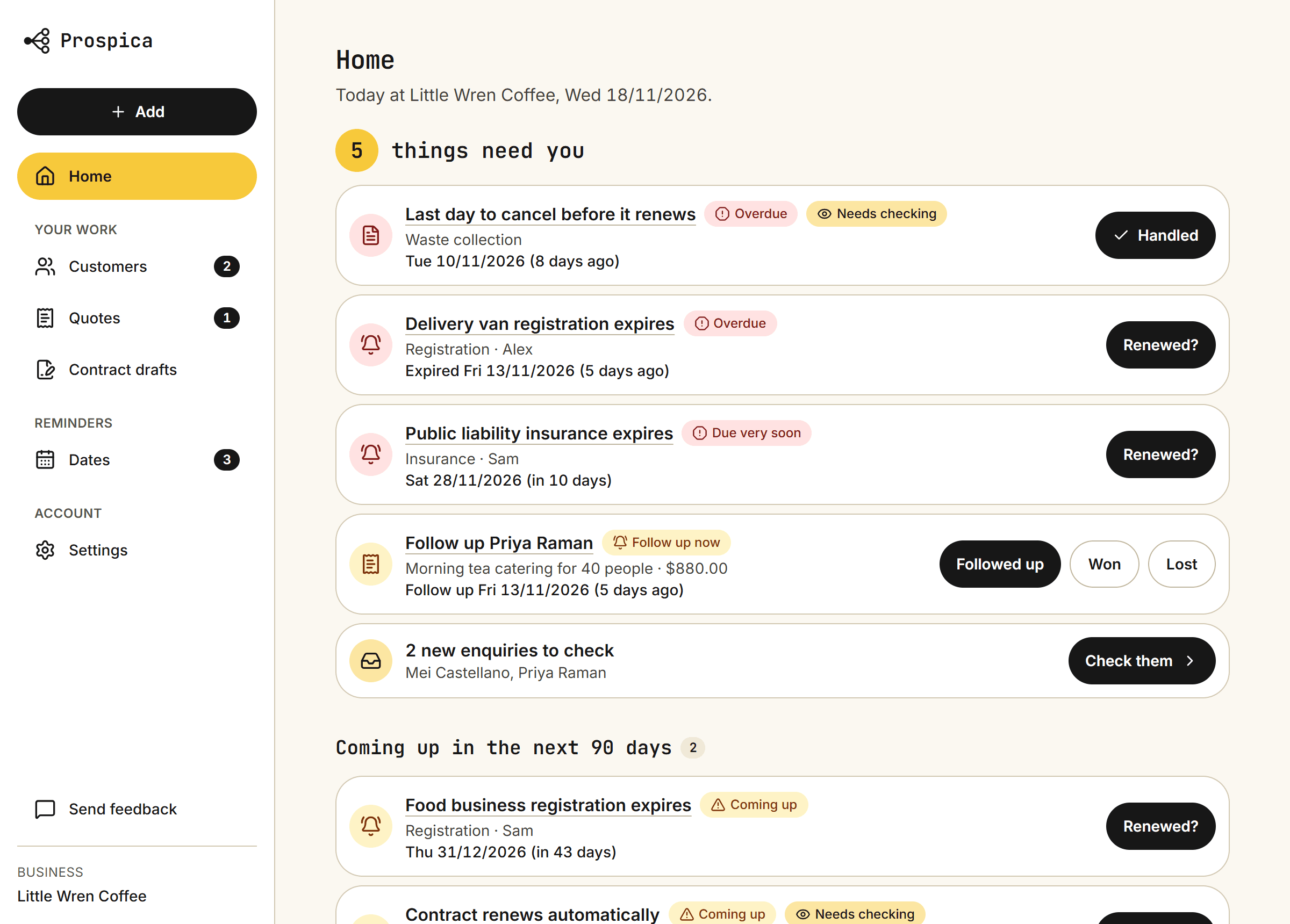
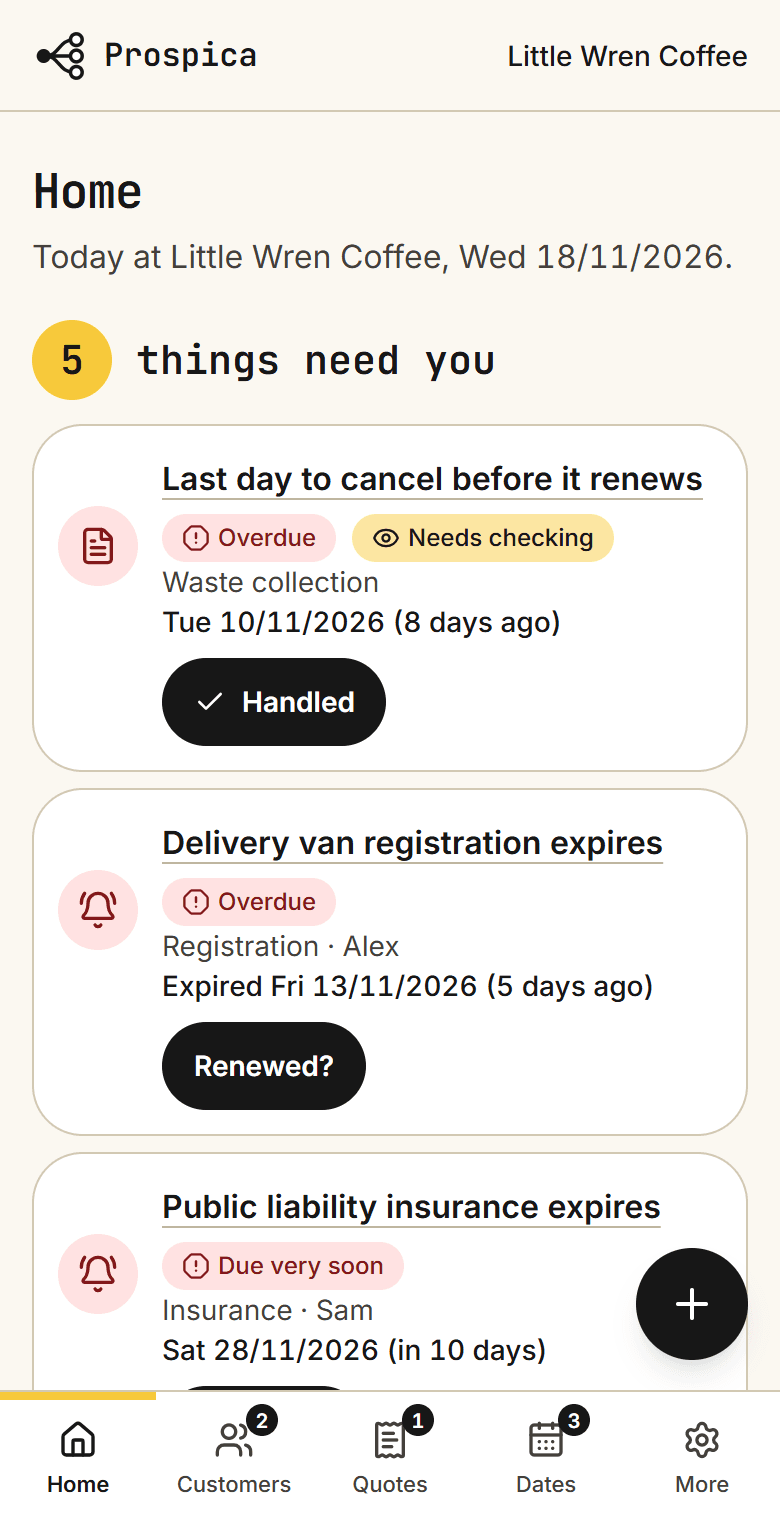
Sign in and you see what needs you first, across every job: a quote to follow up, a date coming up, anything overdue. Each one has a button to deal with it.

  • Switch on only the jobs you need
  • Works on your phone and your computer
  • Download your lists as spreadsheets any time
Home on a phone: 5 things need you, starting with an overdue cancellation deadline, a registration that expired 5 days ago and an insurance policy due in 10 days

Each job has its own screen

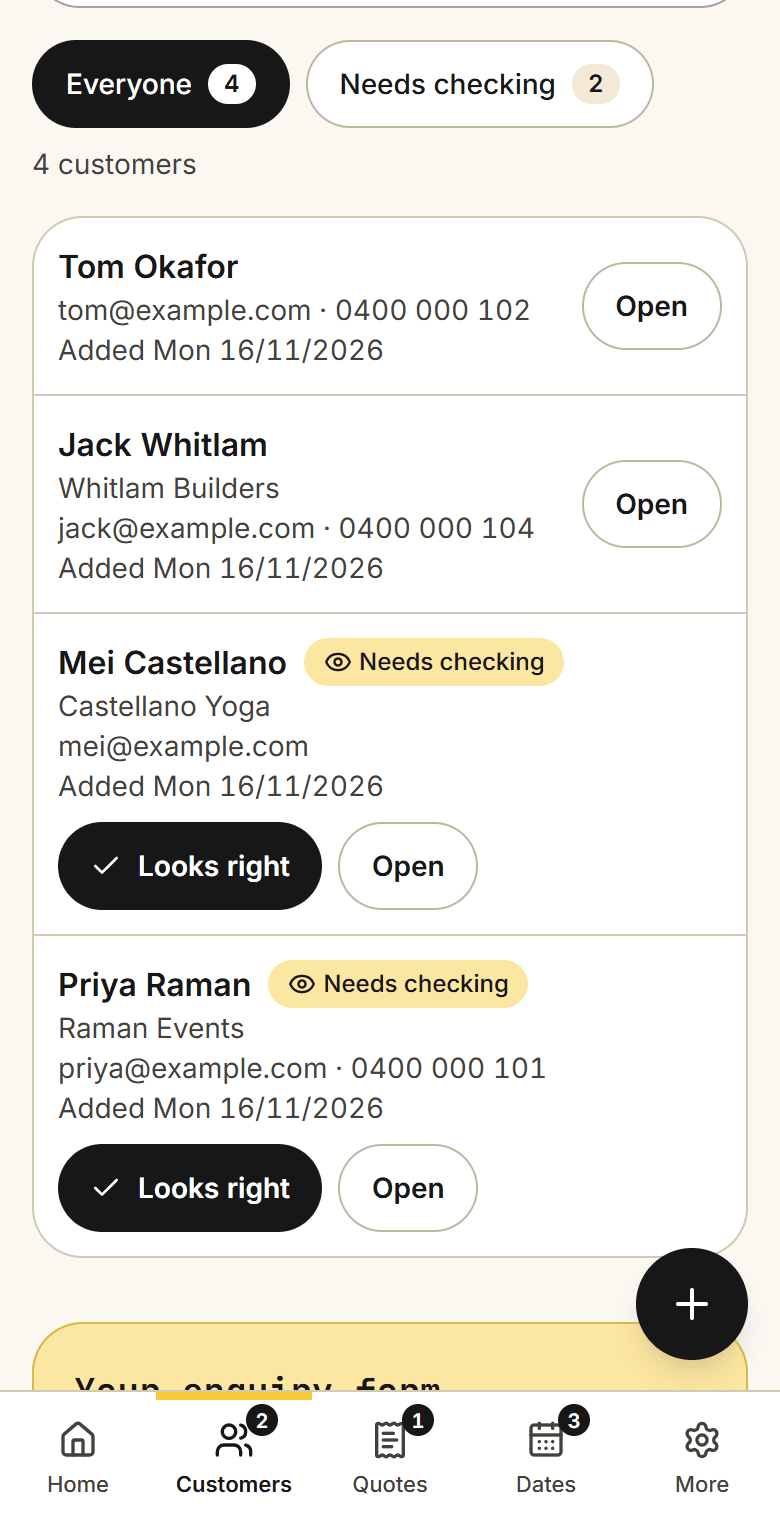
  • The Customers screen on a phone: filter buttons for Everyone and Needs checking, and four customers, two of them marked Needs checking with a Looks right button
    EnquiriesNew enquiries land in your customer list, marked for you to check.
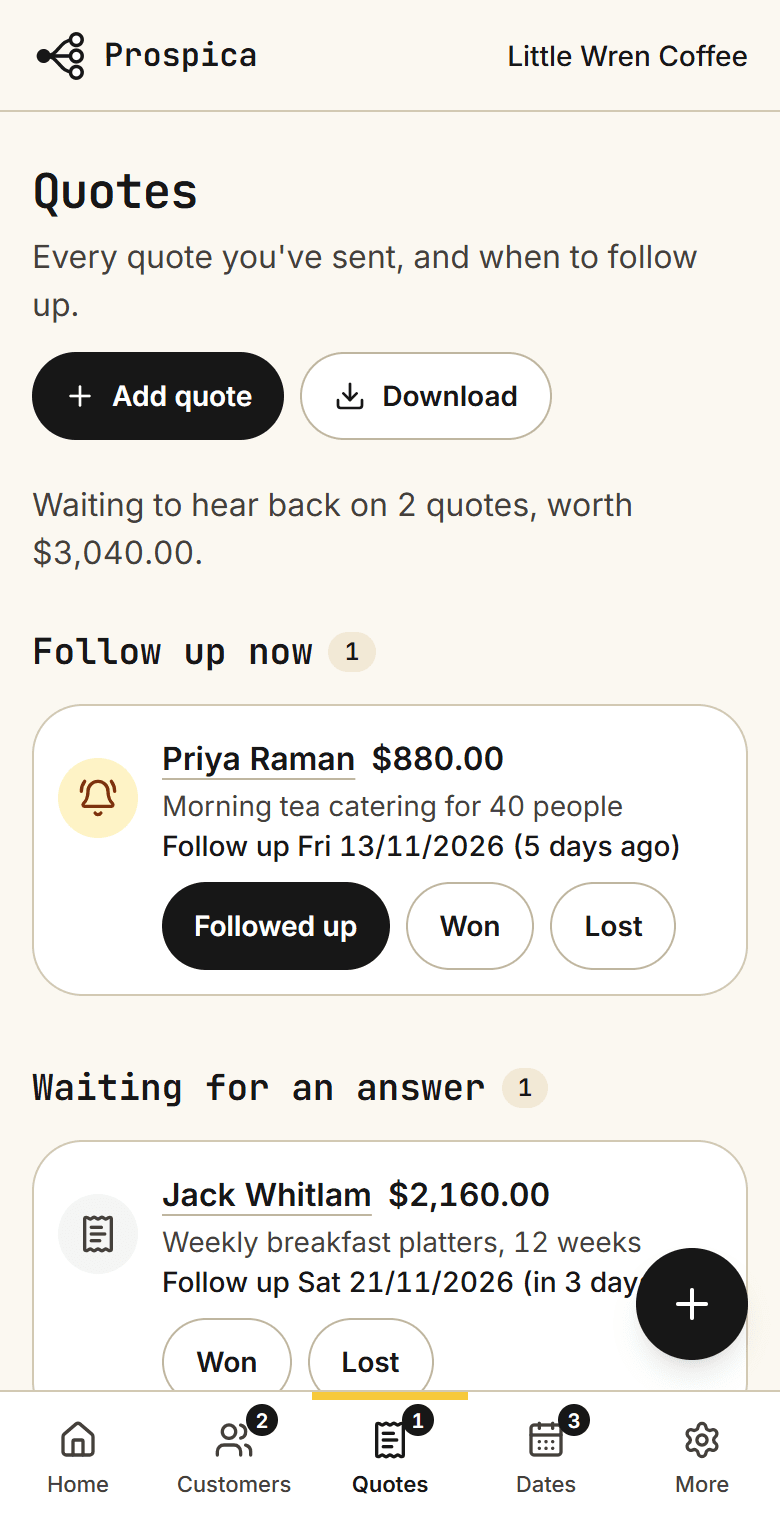
  • The Quotes screen on a phone: waiting to hear back on 2 quotes; one under Follow up now with Followed up, Won and Lost buttons, and one under Waiting for an answer
    QuotesEvery quote you’ve sent, and which ones to chase today.
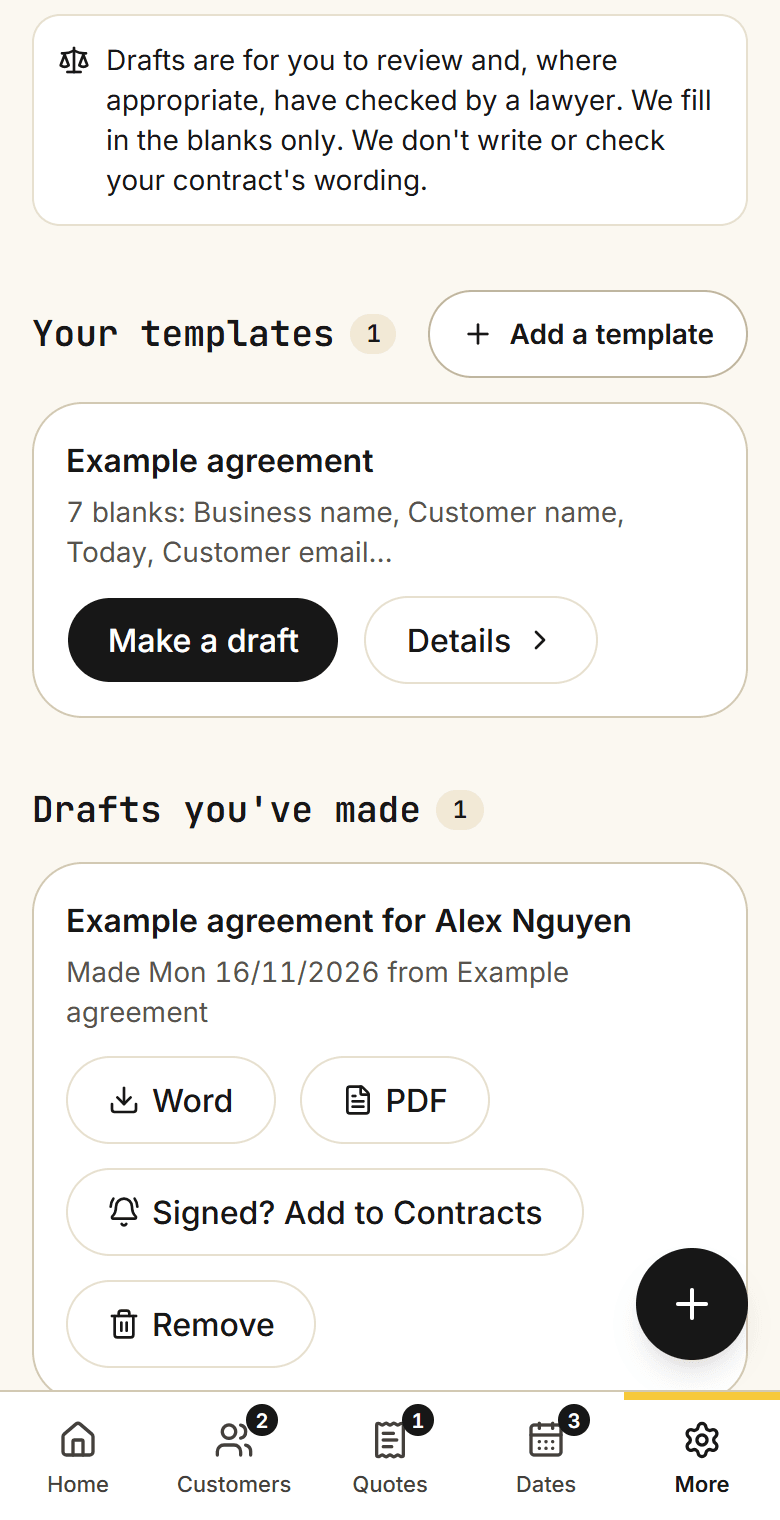
  • The Contract drafts screen on a phone: a note that drafts are for you to review, one template with 7 blanks and a Make a draft button, and one finished draft with Word, PDF and Signed? Add to Contracts buttons
    Contract draftsYour template, and each draft made from it, as Word or PDF.
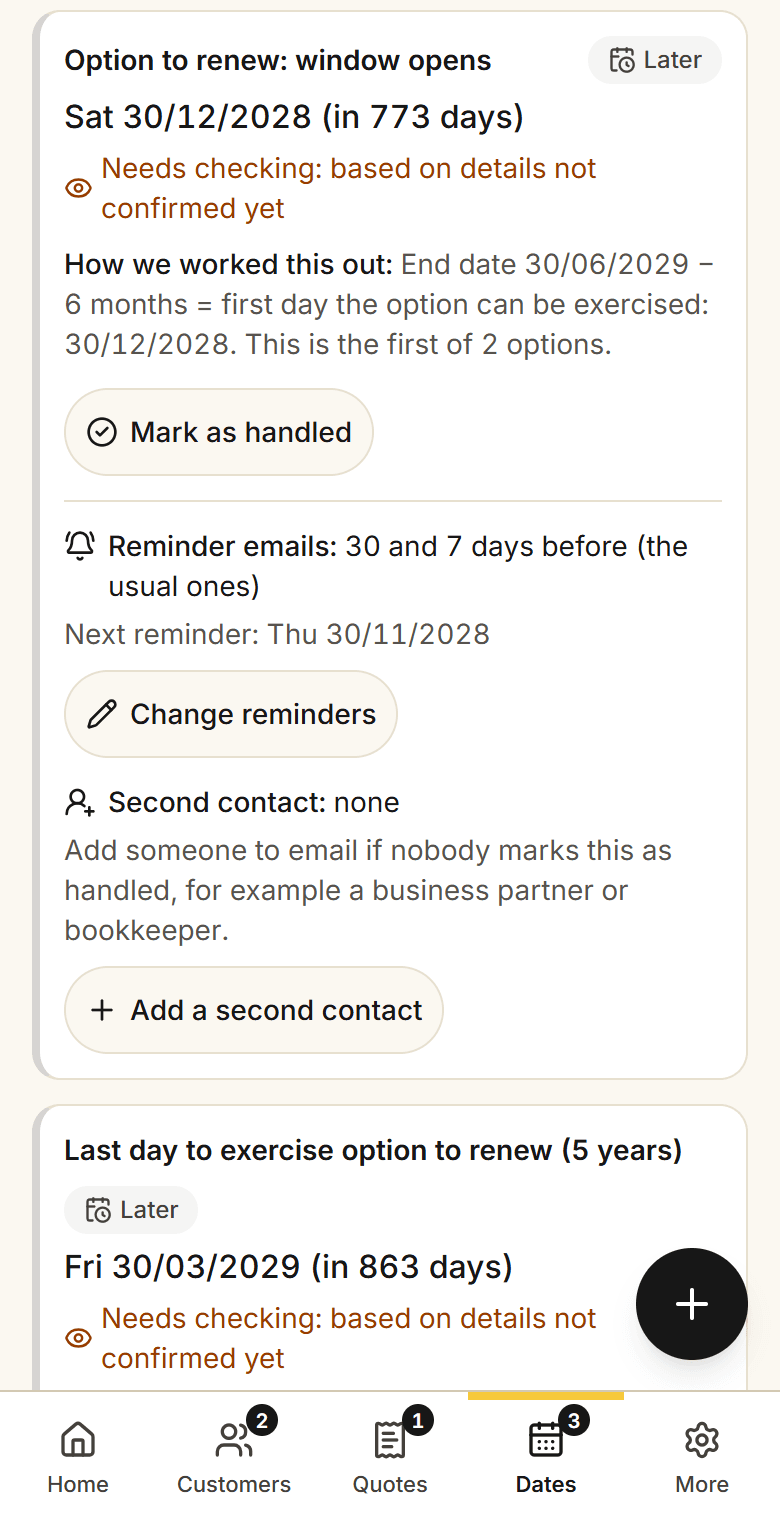
  • A lease in the Contracts screen on a phone: the day the option to renew opens and the last day to use it, each with its date, the days left, and how the date was worked out
    Contracts and leasesEach key date in a contract, with how it was worked out.
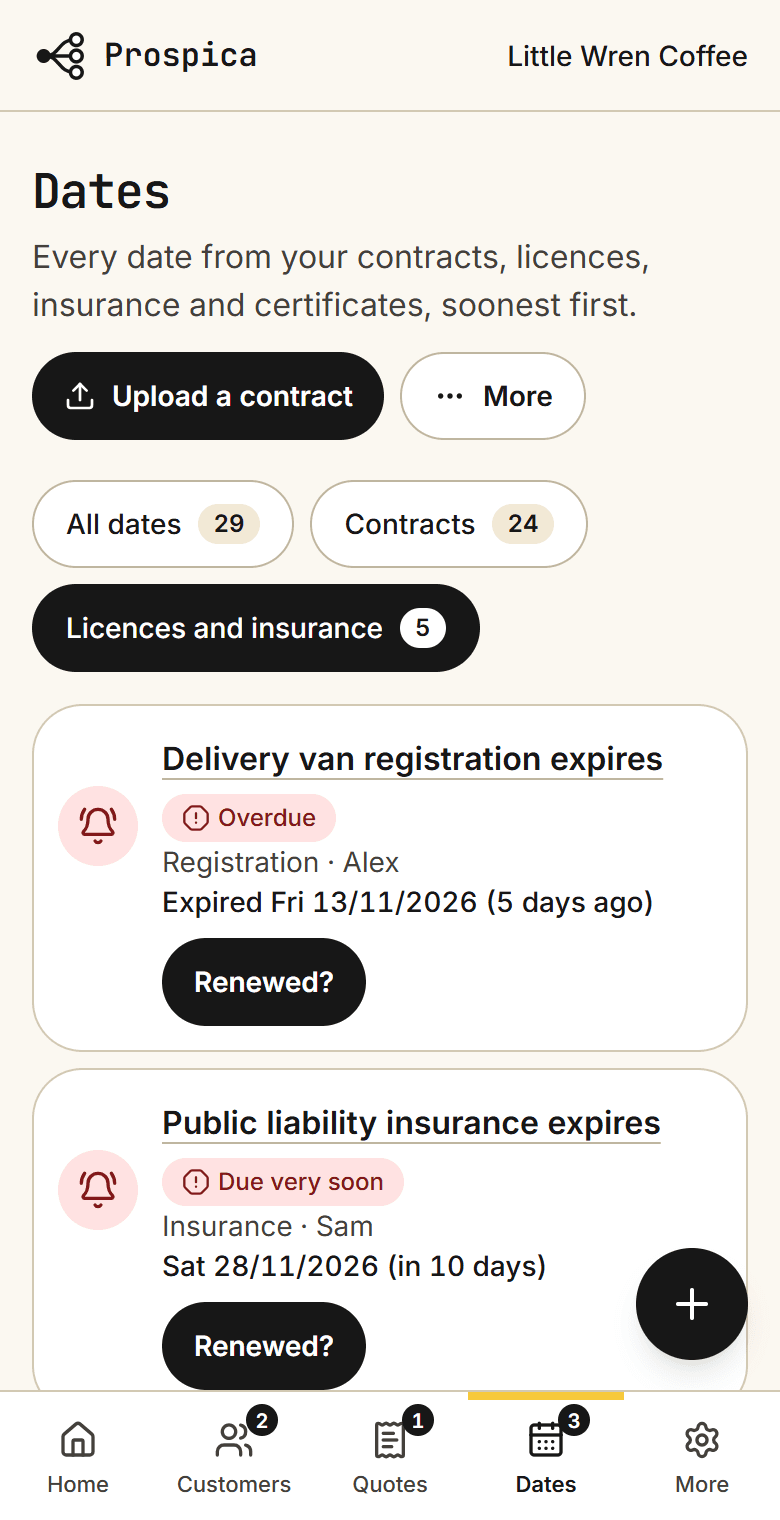
  • The Dates screen on a phone, showing licences and insurance: a registration that expired 5 days ago, marked Overdue, and an insurance policy due in 10 days, each with a Renewed? button
    Licences and insuranceEverything that expires in one list, soonest first.

Swipe sideways to see them all. Real screens from Prospica, shown with made-up example data.

How it works

Everyday jobs, done once.

Each one says what works today and what is still coming.

Enquiries

An enquiry becomes a customer, without retyping

Someone fills in your enquiry form. Their name, company and what they need go straight into your customer list, marked “Needs checking” until you’ve looked.

New enquiry

Hi, could we get a quote for 40 table arrangements on 12 March?

Priya Nair
Nair Events

Customer list

  • Priya Nair · Nair EventsNew
  • James Lee · Bright Ideas Co
  • Olivia Chen · Dream Events
Today:
Enquiry form (as a link or on your website), customer list, upload from a spreadsheet.
Coming:
Reading enquiries that arrive by email.

Quote follow-ups

A quiet quote gets a nudge

You choose how many days to wait. If the customer hasn’t answered, the quote shows up in your reminders. It stops when you mark it won or lost.

  1. Mon 02/03Quote sent to Nair Events
  2. 5 days laterNo reply yet
  3. Mon 09/03Reminder to you: follow up Nair Events
Today:
Quotes list with follow-up reminders in the app.
Coming:
Reminder emails, and a follow-up email to your customer.

Contract drafts

Your own contract, filled in for each customer

Upload the contract you already use, from Word, PDF or Google Docs, and mark the blanks. Pick a customer and their details are filled in. You get a draft to read through, as a Word file or a PDF. The wording stays yours.

Your template

Agreement with {{Customer name}} of {{Company}} for {{Job}} on {{Date}}. Price: {{Price}}.

Draft for you to check

Agreement with Priya Nair of Nair Events for 40 table arrangements on 12 March. Price: $880.00.

Once it's signed, one button adds its dates to your contract reminders.

Drafts are for you to review and, where appropriate, have checked by a lawyer. We fill in the blanks only. We don't write or check your contract's wording.

Today:
Templates from Word, PDF or Google Docs, filled in from your customer list, saved as Word or PDF.

Contract and renewal reminders

A renewal date you can check for yourself

Dates are worked out by fixed rules, and you always see the working, so you can check it against the contract or with your lawyer.

Shop lease · option to renew

Lease ends Wed 30/06/2027
− 3 months’ notice
= last day to renew: Tue 30/03/2027

Reminders from 120 days before, down to the day before.

Today:
Key dates found in PDF and Word contracts, with the working shown, and a feed for your calendar. Scanned pages can be read too; clear scans work best.
Coming:
Reminder emails.

Expiry reminders

Licences and insurance that don’t lapse quietly

Add anything with an expiry date: a licence, an insurance policy, a registration, a staff certificate. It joins one list, soonest first, and you’re reminded before it runs out. When you renew, add the new date and it starts counting again.

  1. 60 days beforePublic liability insurance: coming up
  2. 14 days beforeDue very soon
  3. RenewedNew date added. It starts counting again.

Name who is responsible for each one, so it's clear whose job the renewal is.

Today:
One list of everything that expires, with reminders in the app and your calendar.
Coming:
Reminder emails to whoever is responsible.

Something else?

Tell us what you retype every week. If enough businesses need it, it becomes the next job we add.

Need something just for your business? We can build a custom job as a paid extra, and we'll tell you the price before any work starts.

Tell us

Where things stand

Prospica is new and in early access. The jobs above work today as described. Prices aren't set yet, nothing is charged today, and we'll tell you the price before asking you to pay anything.

Ask about early access
A barber cutting a customer's hair in his shopA builder measuring a length of timber with a tape measure

Built for busy business owners.

Cafés, shops, clinics, trades and small offices. No new system to learn: Prospica sits beside your email, calendar and spreadsheets.

  • Less typing the same details twice
  • Fewer quotes, renewals and licences slipping past
  • More time for the work you actually enjoy

How getting started works

  1. 1

    Tell us what you retype

    Send a short enquiry. We reply by email and suggest what fits your business.

  2. 2

    Bring what you already have

    Upload your customer list, your contract template and your contracts. Put your enquiry form on your website and link your calendar.

  3. 3

    Use it, and tell us what's missing

    You try it with your real work. What you ask for shapes what we build next.

Rather we did it for you? We can bring in your lists and set everything up, as an optional extra.

Trust

Your business details, treated carefully.

  • Who is behind it

    Prospica is a small Australian business based in New South Wales. You deal with the person who builds it.

  • Where your information lives

    Stored in Sydney, in private storage that only your business's members can open. How we handle your data.

  • You see it before your customer does

    Drafts and reminders come to you. The only message a customer gets automatically is a short thank-you after they fill in your enquiry form.

  • You can leave with everything

    Download your customer list, quotes and expiry list as spreadsheet files at any time, and ask us to delete your information.

Prospica helps you stay organised. It doesn't give legal advice. Check important contracts and deadlines with your lawyer.

Tell us what you keep retyping.

Three questions. Everything else is optional.

What happens next

  1. 1We read your message. A person, not a robot.
  2. 2We reply by email and suggest what fits your business.
  3. 3You decide. This is an enquiry, not a commitment, and nothing is charged.
Add more detail (optional)
Which of these sound like you?
Which tools do you use?

We only use these details to reply to you.